Plask Motion
Browser-based AI motion capture and 3D animation editor. Extract full-body skeleton animations from video, edit on a timeline, and export FBX/BVH/GLB for Blender, Unity, or Unreal Engine — no hardware or software install required.
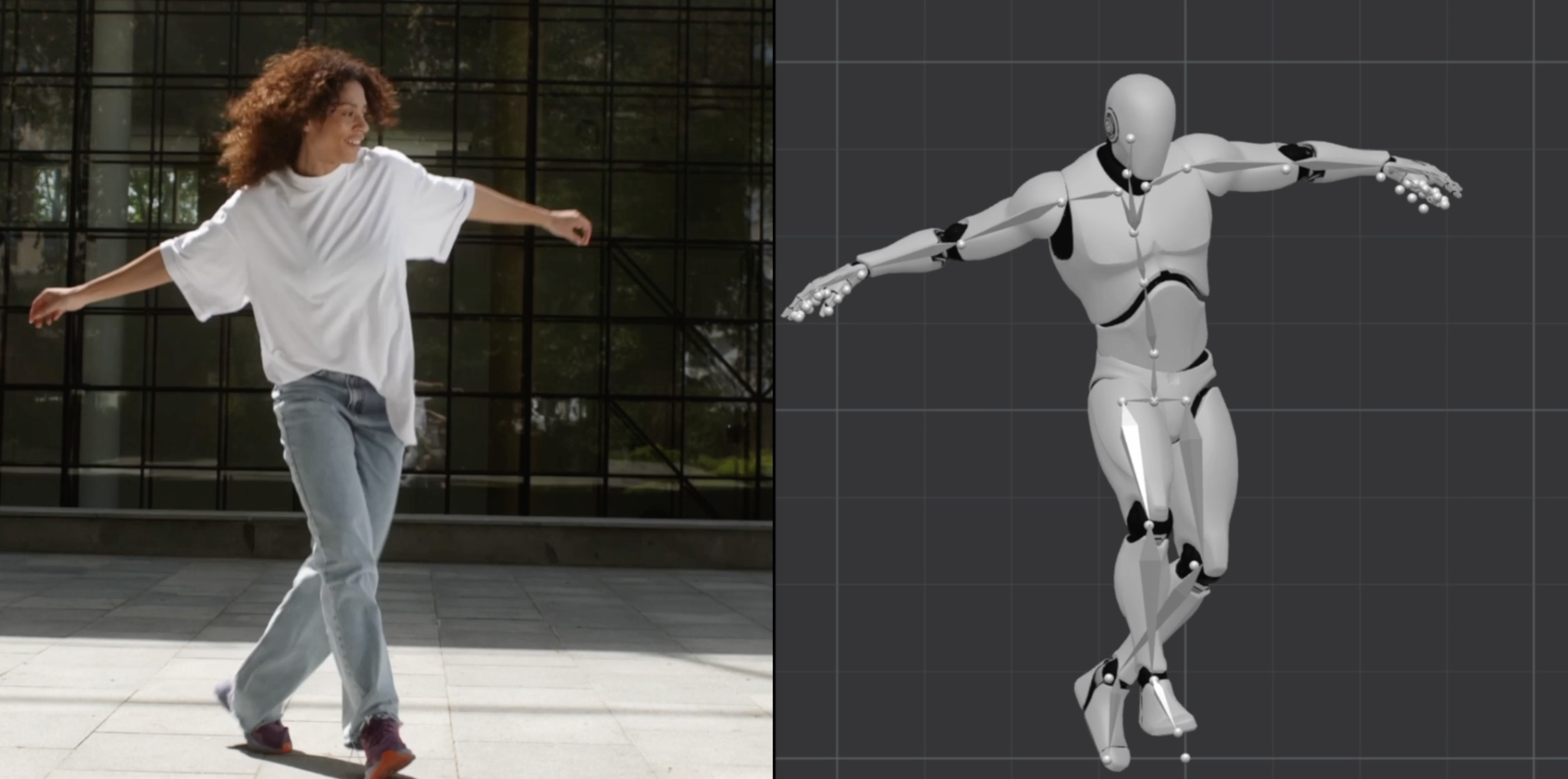
Introduction to Plask Motion
Plask Motion (plask.ai) is a browser-based AI motion capture and 3D animation editor that allows creators, game developers, and animators to extract skeleton animation data from standard video footage and edit it in a full-featured 3D environment — entirely within the browser. No motion capture hardware, specialized cameras, or software installations are required.
Plask operates on a freemium model. The Free plan allows 15 seconds of motion capture per day with 1 GB storage and BVH/FBX/GLB export. The Standard plan costs $18/month (billed annually) and provides 10 minutes of motion capture monthly with 3 GB storage and faster processing. The Pro plan at $50/month (billed annually) provides 1 hour of motion capture, 10 GB storage, priority processing, and pre-release feature access. Prices are subject to change. Check official pricing here.
Plask targets indie game developers, Blender artists, Unreal Engine creators, 3D animators, VR/AR content creators, and motion designers who need accessible, hardware-free motion capture integrated with a real-time 3D editing environment.
Getting Started with Plask Motion
Access Plask entirely in your browser at plask.ai. Sign up for a free account to begin. The interface combines a 3D scene viewer with a timeline editor and animation graph tools — all familiar to users of desktop 3D software, but accessible without any installation. Supported input: MP4 video files. The AI processes motion server-side and delivers results directly into the browser-based editor.
Core Features
AI Motion Capture from Video
Upload any video containing human movement, and Plask's AI automatically extracts full-body skeletal animation at up to 60 FPS. Full body and hand capture are both supported, with multi-person tracking enabling capture of multiple characters from the same footage. The AI analyzes joint trajectories and generates smooth BVH-compatible keyframe data within the browser editor.
Browser-Based 3D Animation Editor
What sets Plask apart is its integrated 3D animation editor — available directly in the browser after capture. Edit keyframes on a timeline, use Graph Editor tools for curve smoothing, apply auto-lighting and camera setups, and preview animations in real-time with scene sharing for team collaboration. This eliminates the round-trip of exporting to Blender for basic adjustments.
Multi-Format Export
Export completed animations in FBX, GLB, and BVH formats — compatible with Blender, Unity, Unreal Engine, Maya, Cinema 4D, and other industry tools. Video rendering (MP4 preview) is also supported for quick review sharing.
Realtime Collaboration
Share your animation scenes with teammates via link. Multiple users can review, comment, and collaborate on scenes in real time — useful for remote game development teams and animation studios working distributed pipelines.
Customizable Effects & Auto Camera
Apply customizable visual effects to your animation preview, use automatic camera and lighting setups for quick rendering, and adjust character scale and position directly in the 3D viewport.
First Project Tutorial
- Go to plask.ai and sign in
- Click "New Project" and select "Motion Capture"
- Upload a video (MP4) of a person performing a motion — ensure full body is visible
- Select capture settings: Full Body, Hand Capture (on/off), number of people to track
- Submit and wait for AI processing (30 seconds to several minutes depending on video length)
- The resulting skeleton animation appears on the 3D timeline editor
- Use the Graph Editor to smooth out jittery keyframes if needed
- Export as BVH or FBX for use in Blender, Unity, or Unreal Engine
Best Practices
- Use well-lit, unobstructed video with a plain background for best tracking accuracy
- Apply Graph Editor curve smoothing in Plask's editor before export to reduce jitter
- Use Blender's Decimate modifier on the imported rig to reduce keyframe density
- Set the Rest Pose correctly in Blender before retargeting Plask animations to custom rigs
- Test with short clips first to preserve your daily free tier limit
Pros & Cons
Pros
- Full-featured 3D animation editor integrated directly in browser
- Free plan with daily motion capture access — great for testing
- Multi-person capture + hand tracking
- Industry-standard export: FBX, BVH, GLB
- Realtime collaboration for teams
- No software installation required
Cons
- Free plan limited to 15 seconds/day — restrictive for production use
- Processing time can be slow for longer clips on free tier
- Browser-based editor less powerful than desktop alternatives (Blender, Maya)
- Tracking accuracy requires good video quality
What Users Are Saying
Plask is widely used in game dev and animation communities, especially for Blender and Unreal Engine workflows:
- r/gamedev — Free AI-powered animation editor and mocap tool announcement
- r/unrealengine — Removing shakiness from Plask animations in Unreal
- r/blender — Plask AI mocap + Blender workflow tutorial
Summary
Plask Motion is an outstanding solution for creators who need AI motion capture with an integrated editing environment — all in the browser. Its combination of free daily mocap access, full-body and hand tracking, a real 3D timeline editor, and industry-standard export formats makes it one of the most complete browser-based animation tools available. For indie game developers and Blender artists in particular, it offers a practical workflow that significantly reduces the barrier to quality character animation.
Reviews
No reviews yetSimilar tools in category
Adobe Premiere Pro
Argil
A platform that simplifies and enhances the process of creating engaging presentations.
Atlabs
A platform that streamlines data analysis and visualization for enhanced decision-making.