
TubeMagic
Effortlessly convert and download videos from various platforms in multiple formats.
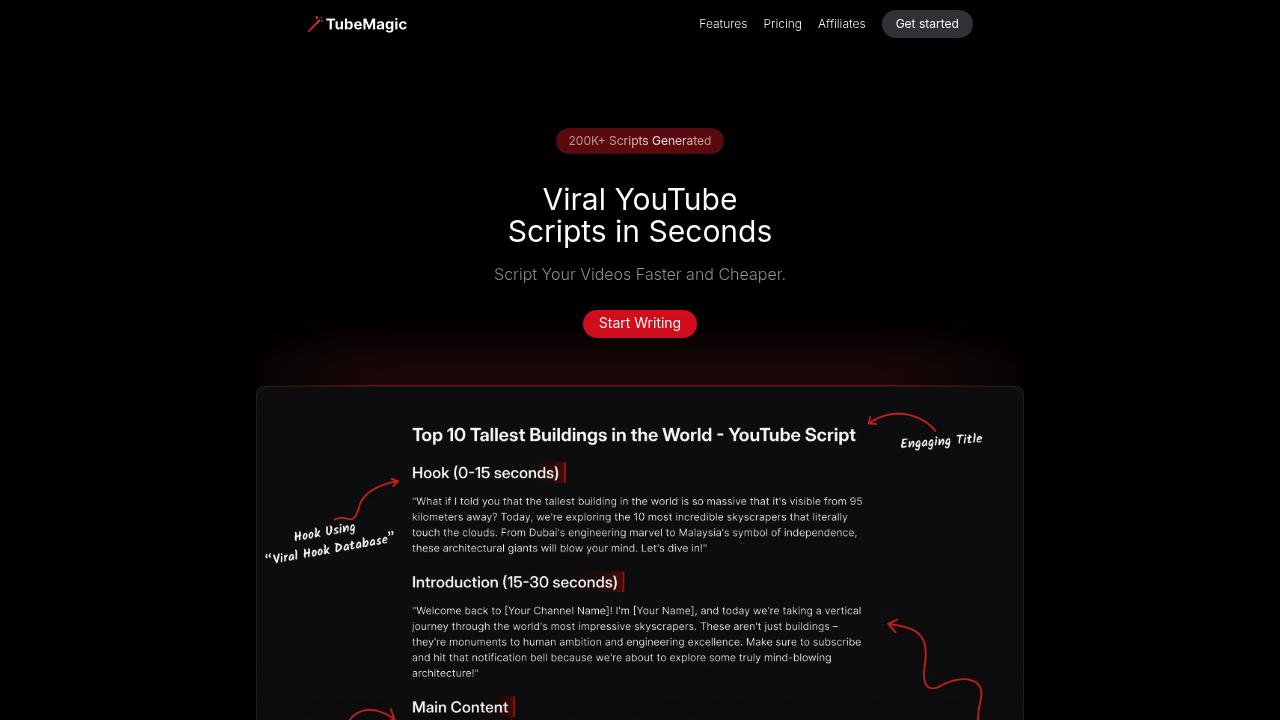
TubeMagic: The Ultimate AI Tool for YouTube Success
Introduction
Overview of TubeMagic
TubeMagic is an AI-powered platform designed to enhance YouTube channels by providing tools for video optimization, keyword research, and audience insights. It simplifies the content creation process, helping users generate titles, descriptions, and tags while optimizing their videos for better reach and performance.
Key Benefits and Use Cases
TubeMagic offers several key benefits:
- Time-Saving Efficiency: Automates tasks like coming up with video ideas, writing scripts, and optimizing videos, saving creators a lot of time.
- Improved SEO and Visibility: Optimizes video titles, descriptions, and tags to improve search rankings and visibility.
- Enhanced Creativity: Provides new ideas for videos and scripts, helping creators keep their channel fresh.
- Increased Audience Engagement: Automates optimization tasks to make videos more engaging and keep viewers interested.
Who Uses TubeMagic
TubeMagic is beneficial for both new and experienced YouTubers. New creators will find its help and tools very useful, while experienced creators can use it to make their content better and work smarter.
What Makes TubeMagic Unique
TubeMagic stands out due to its comprehensive AI suite, which includes:
- AI-Powered Keyword Suggestions: Scans the niche for trending topics and suggests long-tail keywords with low competition.
- Video Optimization Tools: Provides tag suggestions, title recommendations, and thumbnail tips to maximize click-throughs.
- Performance Analytics: Tracks video performance over time, showing which videos drive the most engagement and where the audience is dropping off.
Core Features
Essential Functions Overview
TubeMagic offers several essential functions:
- AI-Powered Script Writing: Generates scripts with templates for various formats.
- Title, Description, and Tag Optimization: Helps optimize titles, descriptions, and tags for better search rankings.
- Comprehensive Keyword Research: Includes a 'magic score' to help with keyword suggestions.
- Trending Video Research Analyzer: Analyzes trending videos in the niche.
- Unlimited Video Idea Generation: Generates video ideas with channel analysis.
- Multilingual Support: Supports over 95 languages for descriptions, titles, tags, community posts, and video ideas.
Common Settings Explained
To get the most out of TubeMagic, users should familiarize themselves with the common settings:
- Channel Analysis: Analyzes the channel data to recommend what works for the niche.
- Data-Driven Insights: Provides clear, actionable insights without the fluff.
Tips & Troubleshooting
Tips for Best Results
To achieve the best results with TubeMagic:
- Regularly Update Content: Upload videos regularly to get detailed insights from the tool.
- Use AI Suggestions: Utilize the AI-powered suggestions for keywords, tags, and titles.
- Monitor Performance: Regularly check the performance analytics to see what’s working and what’s not.
Troubleshooting Basics
Common issues with TubeMagic include:
- Insufficient Data: If you don’t already have some content uploaded, it might not give you detailed insights.
- Subscription Costs: The subscription model might not appeal to everyone, especially those on a tight budget or just starting out on YouTube.
Best Practices
Common Mistakes to Avoid
To avoid common mistakes:
- Overreliance on AI: While AI is powerful, it’s essential to have some control over your content creation process. Make sure to review and adjust the suggestions provided by TubeMagic.
- Lack of Engagement: Don’t forget to engage with your audience. Use the community engagement tool for posts and polls to keep viewers interested.
Performance Optimization
To optimize performance:
- Regularly Update Analytics: Keep an eye on the performance analytics to see which videos are driving the most engagement and where the audience is dropping off.
- Adjust Based on Data: Use the data-driven insights to adjust your strategy and improve retention.
Pros and Cons
Pros
- Time-Saving Efficiency: Automates tasks, saving creators a lot of time.
- Improved SEO and Visibility: Optimizes video titles, descriptions, and tags for better search rankings.
- Enhanced Creativity: Provides new ideas for videos and scripts.
- Increased Audience Engagement: Automates optimization tasks to make videos more engaging.
- Comprehensive Tools: Includes AI-powered script writing, title, description, and tag optimization, and comprehensive keyword research.
Cons
- Decreased Direct Control: Using TubeMagic’s AI might make you feel less in control of your content.
- Subscription Costs: The subscription model might not appeal to everyone, especially those on a tight budget or just starting out on YouTube.
Summary
TubeMagic is an AI-powered platform designed to enhance YouTube channels by providing tools for video optimization, keyword research, and audience insights. It simplifies the content creation process, helping users generate titles, descriptions, and tags while optimizing their videos for better reach and performance. With its comprehensive AI suite, including AI-powered script writing, title, description, and tag optimization, and comprehensive keyword research, TubeMagic is a valuable tool for both new and experienced YouTubers.
Pricing Plans
TubeMagic offers flexible pricing plans:
- Monthly Plan: $67.00 per month (unlimited video ideas, instant script generation, video optimizations, keyword research).
- Annual Plan: Available for less money (contact the official site for details).
- 30-Day Money-Back Guarantee: Try out TubeMagic risk-free with a 30-day money-back guarantee.
Disclaimer: Pricing might be changed, so always check the official site for the latest pricing plans.
Official Pricing Plan Link: TubeMagic Pricing Plans
Reviews
No reviews yetSimilar tools in category
Adobe Premiere Pro
Argil
A platform that simplifies and enhances the process of creating engaging presentations.
Atlabs
A platform that streamlines data analysis and visualization for enhanced decision-making.