
Video Candy
Transform your videos into stunning, eye-catching content effortlessly.
Video Candy: The Ultimate AI-Powered Video Editing Tool
Introduction
Overview of Video Candy
Video Candy is an online video editing platform designed to simplify content creation through its browser-based interface. It combines essential editing capabilities with AI-powered features, making video editing accessible for both beginners and experienced creators.
Key Benefits and Use Cases
Video Candy offers a plethora of features that make it an ideal tool for various users. It can be used for content creation, social media management, educational purposes, and personal use. The platform is particularly known for its user-friendly interface and a wide range of editing tools that make video editing a breeze.
Who Uses Video Candy
Content creators, social media influencers, small business owners, and educators can all benefit from using Video Candy. It is especially useful for bloggers and YouTubers looking for quick video editing solutions, entrepreneurs wanting to create marketing videos without complexity, and teachers needing to prepare video lessons and tutorials.
What Makes Video Candy Unique
Video Candy stands out due to its clean and intuitive design, which makes navigation straightforward for new users. It also works directly in web browsers without the need for software installation. The platform offers quick video processing with high-priority options for paid users, making it a convenient choice for those who need to edit videos efficiently.
Core Features
Essential Functions Overview
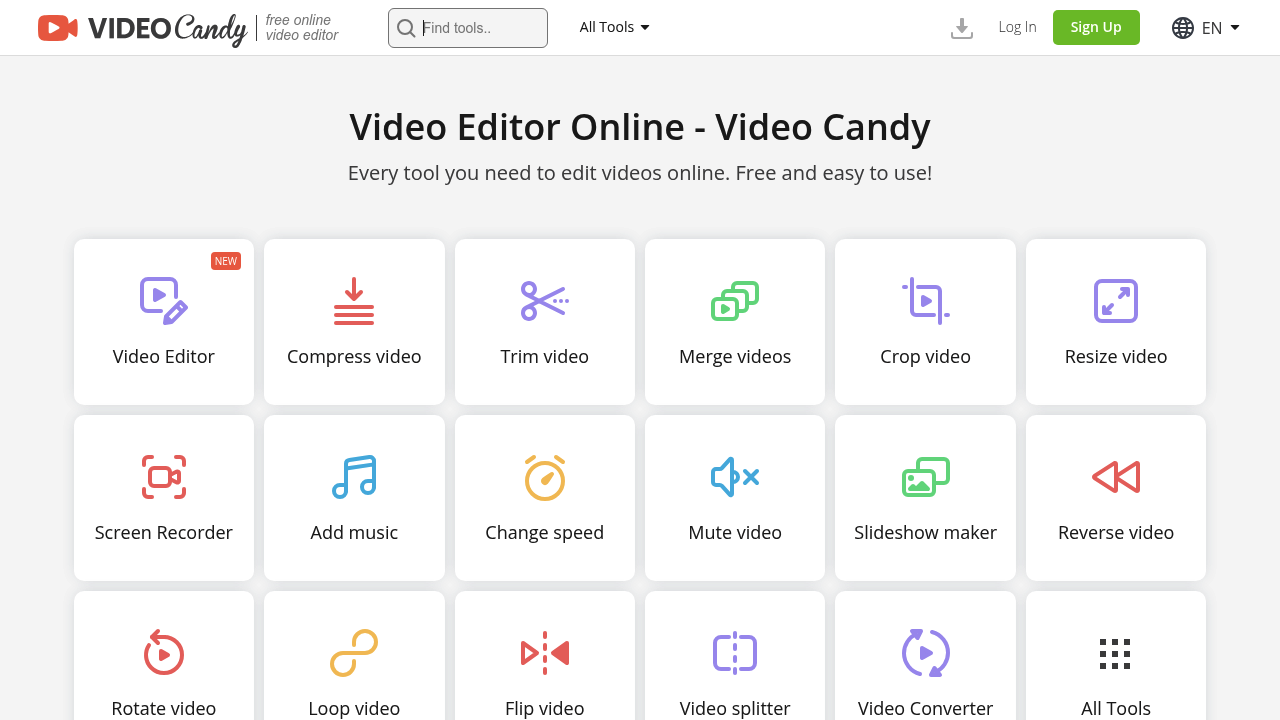
Video Candy offers a variety of essential functions that enhance your video content. Some of the key features include:
- Video Trimming: Cut out unnecessary parts from your videos.
- Video Merging: Combine multiple videos into one seamless video.
- Video Compression: Reduce the size of your videos without losing quality.
- Screen Recording: Capture on-screen activities, perfect for tutorials.
- Audio Editing: Add music, mute audio, or change the speed of the audio in your videos.
- Slideshow Creation: Make captivating slideshows with transitions and effects.
- Advanced Video Manipulation: Reverse, rotate, loop, and flip your videos.
- Video and Audio Conversion: Transform your videos and audio files into different formats.
Common Settings Explained
- Video Processing: Trim, merge, crop, and compress videos while maintaining quality standards.
- Format Conversion: Transform videos into different formats compatible with various platforms.
- Upload and Download: Upload files up to 4 GB and enjoy unlimited downloads with paid plans.
Tips & Troubleshooting
Tips for Best Results
- Stable Internet Connection: Ensure you have a stable internet connection for all operations.
- File Size Limits: Be aware of the file size limits in the free version and upgrade to a paid plan if needed.
- Advanced Features: Premium features are locked behind paid subscriptions, so consider upgrading if you need more advanced functionalities.
Troubleshooting Basics
- Error Messages: If you encounter errors, provide detailed information such as screenshots of error messages, log files, and detailed descriptions of actions taken.
- Refund Policy: Video Candy offers full refunds in specific cases, such as constant errors preventing proper use or accidental multiple purchases.
Best Practices
Common Mistakes to Avoid
- Insufficient File Size: Avoid uploading files that exceed the maximum allowed size in the free version.
- Inadequate Internet Connection: Ensure a stable internet connection to avoid processing delays.
- Overusing Tokens (if applicable): If you're using a token-based system, avoid overusing tokens, as this can lead to additional costs.
Performance Optimization
- High-Priority Processing: Upgrade to a paid plan for high-priority processing, which significantly reduces processing time.
- Optimize File Size: Optimize your file size to ensure faster processing and better quality.
Pros and Cons
Pros
- User-Friendly Interface: Clean and intuitive design makes navigation straightforward.
- No Installation Required: Works directly in web browsers without software installation.
- Quick Processing: Quick video processing with high-priority options for paid users.
- Wide Range of Features: Offers a multitude of features including video trimming, merging, compression, screen recording, and more.
Cons
- Internet Dependency: Requires a stable internet connection for all operations.
- File Size Limits: Free version has restrictions on maximum uploadable file size.
- Advanced Features Locked Behind Paid Subscription: Premium features are locked behind paid subscriptions.
Summary
Video Candy is an excellent AI-powered video editing tool that offers a wide range of features to enhance your video content. Its user-friendly interface, quick processing, and variety of editing tools make it an ideal choice for content creators, social media influencers, small business owners, and educators. While it has some limitations, such as internet dependency and file size limits in the free version, the paid plans offer high-priority processing and unlimited downloads, making it a valuable tool for those who need efficient video editing solutions.
Pricing Plans
Video Candy offers the following pricing plans:
- Monthly Plan: $8 per month
- Yearly Plan: $4 per month
- Lifetime Plan: $99 (one-time payment)
Please note that pricing might be changed, and it's always a good idea to check the official website for the most accurate and up-to-date information: Video Candy Pricing.
Disclaimer: Pricing information is subject to change and should be verified on the official website.
Reviews
No reviews yetSimilar tools in category
Adobe Premiere Pro
Argil
A platform that simplifies and enhances the process of creating engaging presentations.
Atlabs
A platform that streamlines data analysis and visualization for enhanced decision-making.