
Vsub
A platform for analyzing and enhancing video content with automated insights.
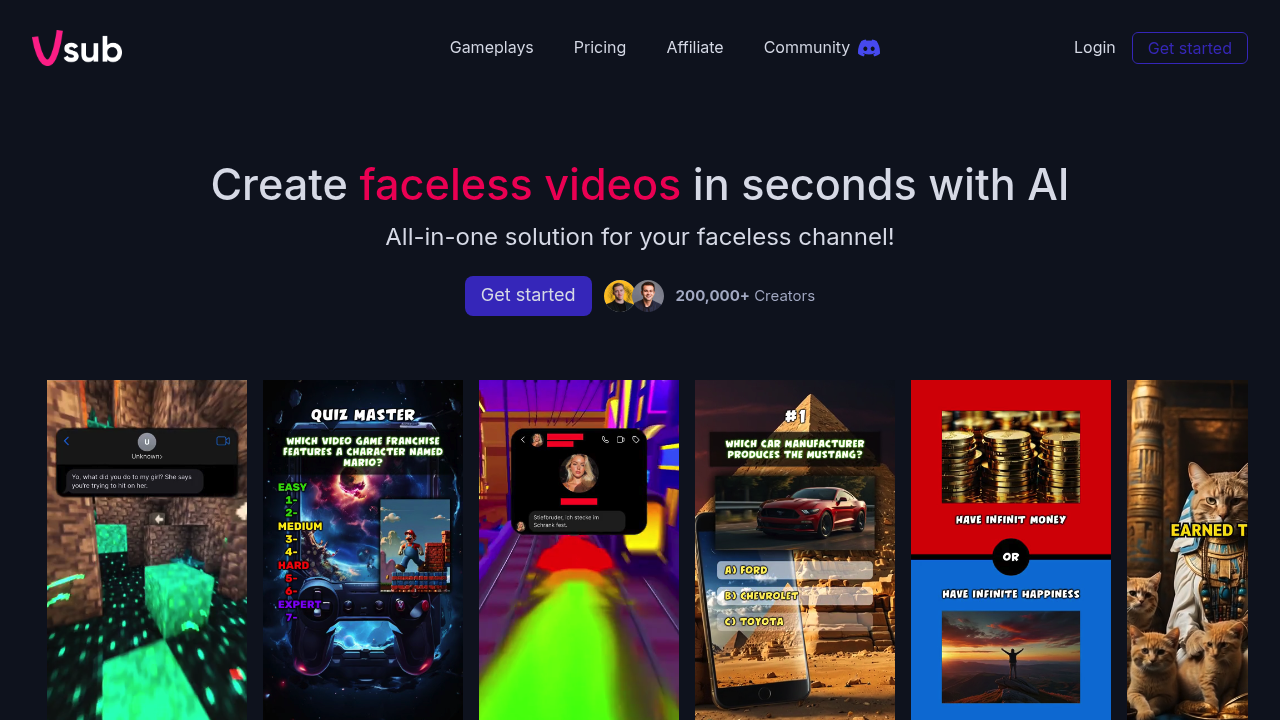
Vsub: The Ultimate AI Video Creation Tool for Content Creators
Introduction
Overview of Vsub
Vsub is an AI-powered video creation tool designed specifically for content creators who produce short-form videos. It allows users to generate AI shorts with a single click, offering multiple templates for various niches like Reddit stories and fake text messages. Vsub also adds auto captions with animated emojis to enhance viewer engagement, making it ideal for YouTubers and TikTokers who prefer to remain off-camera.
Key Benefits and Use Cases
Vsub offers several key benefits:
- Faceless Video Creation: Quickly create engaging videos without showing your face.
- Effortless AI Shorts: Generate AI shorts effortlessly.
- Automated Captions: Add auto captions with animated emojis to enhance viewer engagement.
- Diverse Templates: Access a variety of video templates including Reddit stories, fake text messages, quizzes, and 'would you rather' scenarios.
Who Uses Vsub
Vsub is used by:
- Social Media Managers
- Video Editors
- Content Strategists
- Creative Writers
- TikTokers
- Marketing Coordinators
- Content Creators
- Digital Marketing Specialists
- YouTubers
What Makes Vsub Unique
Vsub specializes in faceless video content creation, catering to YouTubers and TikTokers who prefer to remain off-camera. The tool's animated emoji captions set it apart in the short-form video landscape, allowing creators to captivate viewers without relying on personal appearances.
Core Features
Essential Functions Overview
- AI-Generated Faceless Videos: Create short, engaging videos without showing your face using AI-powered tools and templates.
- Multiple Video Templates: Access a variety of video templates including Reddit stories, fake text messages, quizzes, and 'would you rather' scenarios.
- Diverse AI Art Styles: Choose from multiple AI-generated art styles such as cinematic, cartoon, anime, and 3D animation for your videos.
- Automated Captions: Generate captions automatically with animated emojis to enhance viewer engagement.
Common Settings Explained
- Subscription Plans: Select from various subscription tiers offering different credit amounts and video export durations to suit your content creation needs.
- Credit System: Vsub operates on a credit system, where your usage and access to certain features may vary based on your credit balance.
Tips & Troubleshooting
Tips for Best Results
- Choose the Right Template: Select a template that aligns with your content niche to ensure the best results.
- Experiment with Art Styles: Try out different AI art styles to find the one that best fits your video's aesthetic.
- Use Animated Emojis: Incorporate animated emojis into your captions to make your videos more engaging.
Troubleshooting Basics
- Check Credit Balance: Ensure you have sufficient credits to access all features.
- Review Template Settings: Double-check the template settings to avoid any errors.
- Contact Support: If you encounter any issues, contact Vsub's support team for assistance.
Best Practices
Common Mistakes to Avoid
- Overusing Templates: Avoid overusing the same template; mix and match different templates to keep your content fresh.
- Ignoring Captions: Don’t neglect adding captions; they significantly enhance viewer engagement.
- Not Experimenting: Don’t be afraid to experiment with different art styles and features to find what works best for you.
Performance Optimization
- Optimize Video Length: Ensure your videos are optimized for the chosen export duration (up to 10 minutes for higher-tier plans).
- Use Custom Fonts: Utilize custom fonts to make your videos more personalized and engaging.
- Bulk Upload/Export: Take advantage of bulk upload/export features to streamline your workflow.
Pros and Cons
Pros
- Effortless Video Creation: Generate high-quality videos quickly and efficiently.
- Customization Options: Offers a wide range of customization options including multiple templates, art styles, and captions.
- Engaging Content: Creates engaging faceless videos that captivate viewers.
- Flexible Pricing Plans: Provides flexible subscription tiers to suit different content creation needs.
Cons
- Credit System Limitations: The credit system can be limiting for users who need frequent access to certain features.
- Learning Curve: May require some time to learn how to effectively use all the features.
- Dependence on AI: Relying on AI-generated content might not be suitable for all types of videos.
Summary
Vsub is an innovative AI video creation tool designed to help content creators produce high-quality, engaging faceless videos quickly and efficiently. With its diverse templates, AI art styles, and automated captions, Vsub offers a versatile solution for YouTubers, TikTokers, and other social media influencers. While it has its limitations, Vsub remains a valuable asset for those looking to elevate their video production.
Pricing Plans
Vsub offers various pricing plans:
- Hobbyist: $29/yearly (5 videos/month, Vsub watermark, export up to 2 min).
- Starter: $180/yearly (10 videos/month, no watermark, export up to 2 min).
- Pro: $480/yearly (unlimited videos, no watermark, export up to 10 min, custom fonts, 90 days upload storage).
- Enterprise: Custom pricing for unlimited videos, no watermark, export up to 10 min, custom fonts, bulk upload/export, and more.
Disclaimer: Pricing plans are subject to change and may not reflect the current pricing at the time of reading. For the most up-to-date pricing information, please visit the Vsub Pricing Page.
Reviews
No reviews yetSimilar tools in category
Adobe Premiere Pro
Argil
A platform that simplifies and enhances the process of creating engaging presentations.
Atlabs
A platform that streamlines data analysis and visualization for enhanced decision-making.