Artflow AI
AI creative studio for consistent character generation and animated storytelling. Create unique AI actors that maintain visual identity across multiple scenes — ideal for animated series, visual narratives, and character-driven social media content.
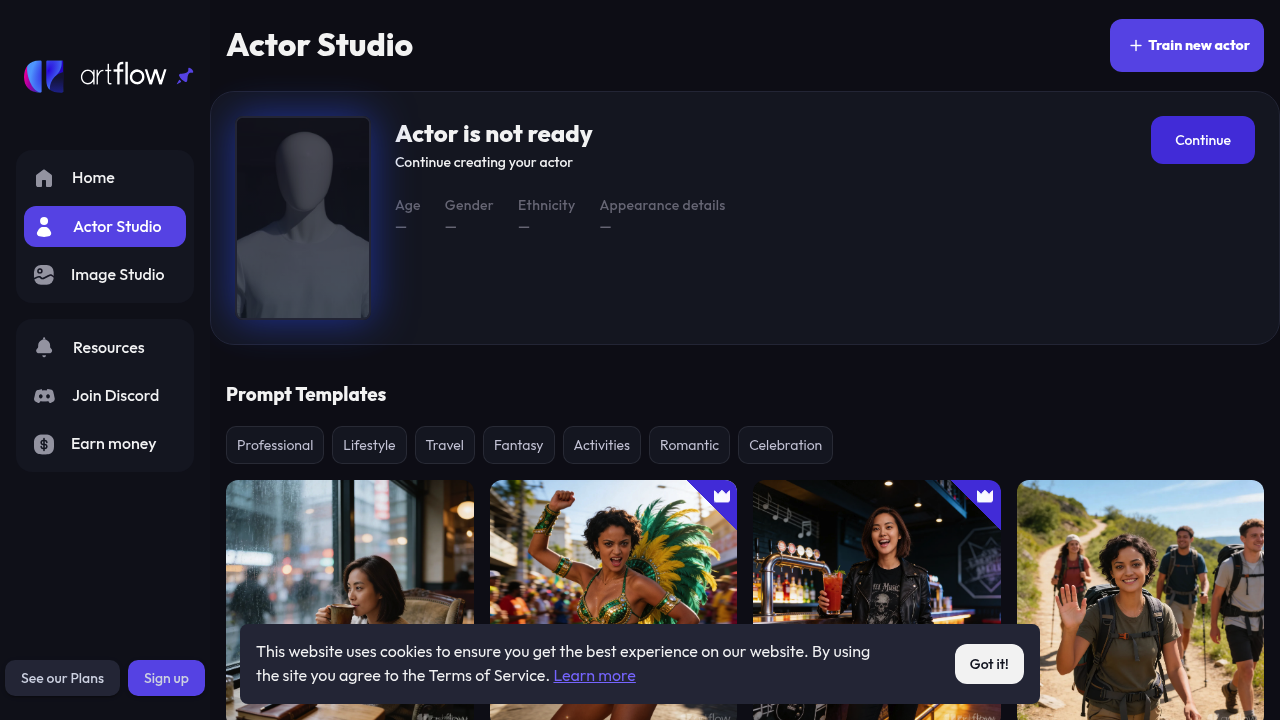
Introduction to Artflow AI
Artflow AI is an AI-powered creative studio specializing in consistent AI character creation and animated storytelling. The platform enables creators to generate unique AI actors (avatars) that maintain visual consistency across multiple images and scenes, making it possible to build cohesive visual narratives, animated stories, and character-driven video content without traditional animation skills.
Unlike generic AI image tools, Artflow's proprietary "Actor Studio" technology locks character identity — facial features, style, and appearance — so the same character can be portrayed in different poses, settings, and expressions while remaining recognizably the same person. This is a critical feature for storytellers who need consistent characters across scenes.
Artflow AI offers a freemium model with a free tier granting basic access to character and image generation. Paid plans (available via artflow.ai/pricing) unlock higher generation quotas, commercial use, priority processing, and access to advanced animation features. Prices are subject to change. Check official pricing here.
The platform serves storytellers, indie filmmakers, social media content creators, game designers, educators, and marketing teams who need visually consistent AI characters for video and animated content.
Getting Started with Artflow AI
Artflow AI operates fully in the browser at artflow.ai. No software installation is required. Sign up with email or Google account to access the Actor Studio and Image Studio immediately. The onboarding flow guides new users through creating their first AI actor and generating their first scene.
Requirements: A modern web browser (Chrome recommended), internet connection. GPU-accelerated generation is handled server-side — no local hardware requirements.
Core Features
Actor Studio — Consistent AI Character Creation
The flagship feature of Artflow AI is the Actor Studio, which generates AI "actors" (characters) that maintain visual consistency across multiple generations. Define a character's appearance via text prompt or reference image, and Artflow locks their identity for reuse. This solves one of generative AI's biggest limitations: the inability to maintain consistent character appearance across scenes.
Actors can be placed in diverse settings, performing different actions, with varied lighting and composition — while their core appearance remains stable. This enables multi-scene storytelling, comic-style narratives, and animated social media content.
AI Image Generation
Beyond characters, Artflow provides full-featured AI image generation with support for various artistic styles: professional, lifestyle, travel, fantasy, activities, romantic, and celebration themes. Prompt templates help beginners craft effective image generation inputs.
Story & Video Creation
Using your created actors, Artflow's Story feature lets you sequence scenes together to form video narratives. Each scene uses the same actor in different situations, building a coherent visual story. Completed sequences can be exported as video content suitable for YouTube, Instagram, or promotional use.
Director Mode
An advanced feature recognized on Product Hunt, Director Mode allows more granular control over character positioning, camera angle simulation, and scene composition — giving creators a filmmaking-style interface for AI-generated character content.
First Project Tutorial
- Visit artflow.ai and create a free account
- Navigate to Actor Studio and click "Create New Actor"
- Describe your character using a text prompt (age, gender, hair, style, ethnicity)
- Generate and select your preferred actor from the results
- Click "Use Actor" and navigate to the Image Studio
- Create a scene by writing a scene prompt — e.g., "Actor standing in a sunlit forest, looking upward, cinematic lighting"
- Generate the scene — your actor will appear consistently rendered in the new setting
- Repeat with different scene prompts to build a multi-scene story
- Use the Story feature to sequence scenes into an exportable video
Best Practices
- Define actors with specificity — detailed prompts produce more consistent and unique characters
- Keep scene prompts focused — one action/setting per scene for clarity
- Use the same actor across all scenes in a story project to maintain narrative coherence
- Experiment with lighting descriptions (golden hour, studio lighting, neon, candlelight) to set the mood
- Use Director Mode for full control over complex compositions
Pros & Cons
Pros
- Industry-leading consistent AI character generation across scenes
- Full storytelling workflow from character creation to video output
- Director Mode for advanced composition control
- Browser-based, no downloads required
- Free tier available for exploration
Cons
- Primarily portrait/character-focused — not suited for general video editing
- Animation quality limited compared to dedicated video generation tools
- Pricing details require visiting the platform directly
What Users Are Saying
Artflow AI has been praised across creative communities for its character consistency capabilities:
- r/AIToolTesting — Honest experience with Artflow AI character creation
- r/Pathfinder_Kingmaker — Using Artflow AI for character portraits
- r/wiedzmin — Community testing Artflow AI for fictional character generation
Summary
Artflow AI fills a unique niche in the AI video ecosystem: consistent AI character generation for storytelling and video content. If your creative project requires characters that look the same across multiple scenes — for social media series, animated stories, educational content, or marketing — Artflow AI provides the most practical solution currently available in a browser-based, no-code format.
Reviews
No reviews yetSimilar tools in category
2short.ai
Generate concise and engaging summaries for any text.
AI Studios
Generate high-quality videos and images tailored to your needs.
Argil
A platform that simplifies and enhances the process of creating engaging presentations.